
FRP Bypass BLU — How to Remove FRP Bypass on BLU Phones
6 min read
Even though the Google account verification was launched years ago with Android 5.1, there are still many users who don't fully understand how it works. This is especially true for people who don't know much about devices or don't own very well-known brands. So FRPRemoval has decided to change that, and today we are going to talk about how to remove FRP Bypass BLU and explain in more detail how this unlock works, so you can get a better idea if it happens again.
Why FRP Bypass May Fail on Some BLU Devices?
Having to deal with the factory reset protection without the right tools can be complicated, as it can slow the unlocking process or just fail right away. Because of that, we wanted to provide more information about this process so you can take it as recommendations before you bypass the Google verification on your BLU.

Latest firmware blocking common tools
The Android version of your device can affect the FRP bypass tools you use to remove the account verification. If your version is not supported by the current tool or bypass APK, you will need to check for other alternatives or try to recover the password with Google.
Quick tip: Check Android version compatibility first before trying any bypass method.
Incompatible Hardware or Software
Some BLU models may have hardware security features that prevent FRP bypass tools from functioning properly. For example, devices with MediaTek processors might be more difficult to unlock compared to those with Qualcomm processors due to differences in the chipset architecture.
Good to know: Processor type matters for bypass success — the method that works on one BLU model might not work on another.
An Android Device Has Already Been Reported or Locked by Google
Besides adding the FRP lock to your Android device, if the smartphone has been flagged as lost or stolen, Google's Device Protection systems may have already blacklisted the device, making it more difficult to use FRP bypass methods. This is very common on secondhand devices that have been erased through the Find My Device app.
Watch out: Blacklisted devices are harder to unlock. If you suspect your BLU phone has been flagged, verify the status before trying bypass methods.
Can the FRP Unlock Be Done Without an Internet Connection or a SIM Card?
Having an internet connection is necessary, as you need to verify the Google account credentials to access the main screen. If you don't have Wi-Fi or mobile data, then you will be stuck on the "select a network" option. Also, keep in mind that in order to use FRP tools, you will also need internet to either download the tool or access the page to complete the step-by-step (like in the case of FRPRemoval, for example).
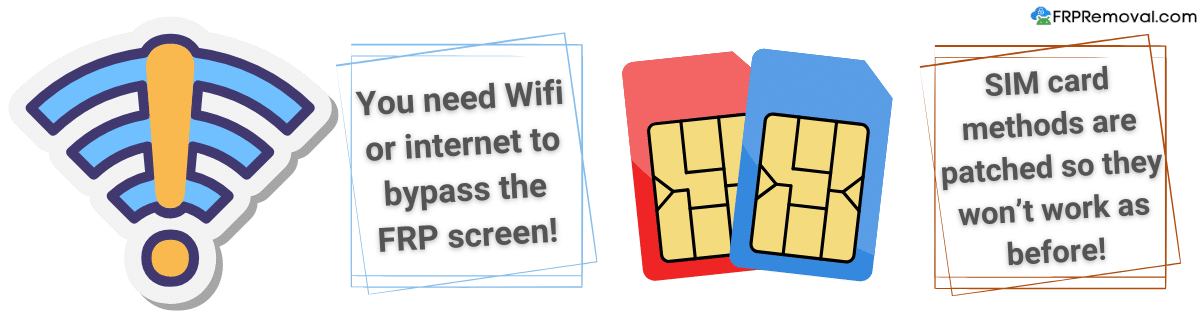
Now, for SIM bypass solutions, it is complicated, and many methods that involve this chip are no longer available or working. What it did before it got patched was use the SIM contacts or messages to try to access the settings or browser and download the FRP bypass APK or program. However, since the emergency dialer doesn't give access anymore, it is no longer a viable option to bypass the FRP lock.
Are There Any Security Patch-Level Updates and Limitations to Unlock BLU Devices?
That's correct, as newer patches tend to include improvements in security that can make it more difficult or impossible to bypass FRP and unlock the device using traditional methods. Even though Android users always find a way to access their devices, there are some specific updates designed to patch any exploit or method to bypass the Google lock, and with each new Android version, these locks and restrictions become more complicated.
Good to know: Each Android update makes FRP bypass increasingly challenging as security measures evolve.
Do I Need Technical Knowledge to Bypass Google Accounts?
It depends on what you use to bypass the Google account. For instance, if you use a program that requires a PC and a cable, you might need to have some basic knowledge about the device. For other methods that involve custom firmware, ROM installation, or other types of system updates, you need to know more, as you can brick the device or have more issues than just being locked out of your BLU phone.
Quick tip: Technical knowledge requirements vary by method — from basic to advanced depending on approach. Online services are the simplest option.
What Are the Advantages of Using Online Tools Over APKs?
The biggest advantage of using online services to bypass Google account verifications is that you don't need to download anything! Since many APKs are unavailable on the Google Play Store, enabling specific permissions is necessary to use them. However, the FRP complicates access to these settings, making it nearly impossible to obtain a functional APK on newer BLU phones.
On the other hand, FRP unlock services can help with a lot of devices in just a few steps, from any browser and with just a stable internet connection. Services like FRPRemoval can also unlock a wide range of Android devices and BLU models with the same method, allowing the user to regain access without so much hassle and wasted time.
Can I Use FRPRemoval to FRP Bypass Without PC on My BLU Device?
Yes! For our services, it is not mandatory to have a PC, as you can do this process from any device that has access to a browser. It can be another phone, a tablet, or a laptop, and you don't need to have a special cable or anything to access our site and remove Google accounts. To start the process, just follow the steps we are going to mention below!

- Works from any browser — no app or software download needed.
- Compatible with any device you have available (phone, tablet, laptop).
- No cables or USB connections required.
- Quick process with just a stable internet connection.
Step-by-Step Guide to FRP Bypass BLU Phones with FRPRemoval
To use the best way to bypass this lock on Android devices, and especially for BLU phones, you only need to go to FRPRemoval.com and complete the following steps:
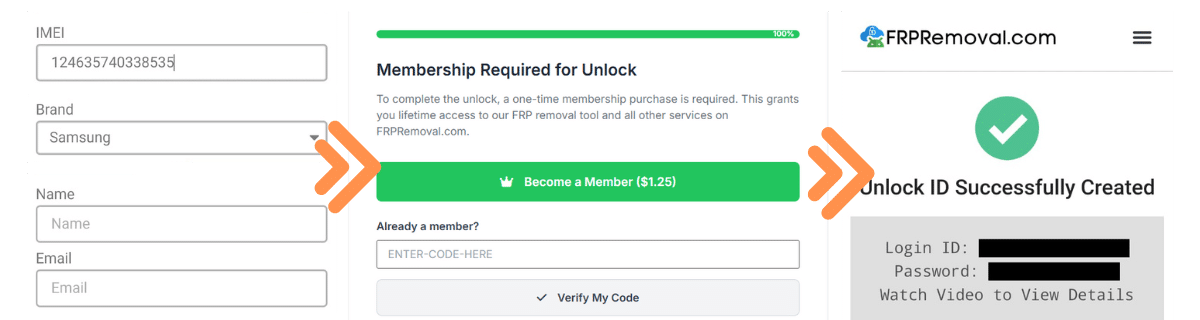
- Enter device information: Please enter your phone brand, IMEI number, full name, and email.
- Complete registration: To create your order, please complete the registration process and get your key.
- Process payment: Once you make the payment for the service, wait for the servers to pick up your order.
- Receive dummy ID: Get the dummy ID created to bypass the FRP lock on your BLU device.
- Setup device: Enter the credentials on the device and complete the initial setup.
- Manage Google account: Delete or add a new Google account.
That's it! With these 6 simple steps, you'll regain full access to your BLU device. Try FRPRemoval now.
Start FRP Removal Now