
The Best Tool for Google FRP is Here! – FRP Android 13
Smooth, Fast and Sercure Unlocking!
Stuck on the FRP lock screen? Our FRPRemoval online service unlocks any Android device, including those running Android 13, in just minutes — all for only $1. We support all major brands and models, with a safe, fast, and hassle-free process. Don’t wait — regain full access to your phone today!
Although Google account verification is a great security measure to protect your data and Android 13 phone, there are situations where it can be annoying and stressful. Because of that, FRPRemoval has decided to help by creating a special tool that can FRP unlock Android 13 devices in no time while also teaching you what this lock is and how you can avoid it next time. We invite you to keep reading to learn more about this topic and see the best option to remove this lock.
Is FRP Unlock an Android 13 Phone Safe and Legal?
It is, as long as you use an official or trustworthy method to bypass the FRP lock. Although FRP bypass tools are a good option, always go for the official and safe method first to avoid any issues with the device and not get into legal trouble (some places can charge you for tampering with the FRP protection). Google, for instance, has a recovery page where you can try to get back your password, and some manufacturers can even help with an FRP lock if you present valid proof of purchase.
Going back to bypassing Google FRP lock tools, we recommend only using them when you have tried everything to recover the credentials. Once you are on the tool of your choice, make sure to look at the procedure for unlocking it, and don’t forget to check the general reviews. Remember that not all tools are safe, so avoid installing old FRP bypass APKs or programs that look broken, as that can damage the device.

What Happens If I Remove the Google Account After the FRP Unlock?
Besides the FRP being disabled, you can also have some limitations inside the Android device. Since all Google services require an email, you won’t be able to access any of their features, whether it is the cloud backup, downloading certain apps, or using services like Drive, Google One, or backup settings. So, the only reason you should remove Google accounts is to either restart the phone and not enable the FRP, or because you will sell it and need all the info gone.
How to Prepare Before Unlocking FRP on Android 13?
Before you try to FRP bypass Android phones with other tools or remove the Google account credentials with FRPRemoval, there are several things you need to check to ensure that it is going to work and to avoid possible issues or loops. In this section, we will name them so you can do it before you move to the next step.
Essential Preparation Steps
- Try to recover the original Google account email and password.
- Fully charged battery (at least 80%).
- Make sure there's a stable Wi-Fi connection.
- Research Android 13-specific bypass methods (many older tricks are patched).
- Ensure tools or any FRP bypass APKs are from trusted sources.
- Avoid random YouTube tricks or shady "unlock tools" without reviews.
Can I Back Up anything before trying an FRP Bypass Tool?
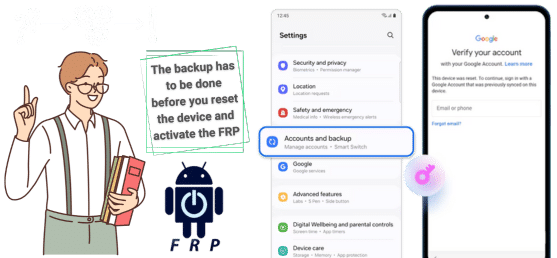
Once FRP is triggered after a factory reset, you’re locked out and can’t back up data anymore. The backup has to be done before the reset and needs to be done on another account, device, or PC. The reason is that if you keep the backup on the email you don’t have access to, your info will be lost, as many FRP bypass tools for Android delete this account in order to regain access. So, be careful and try to always have more than one backup.
Are there other Alternative Solutions to Bypass FRP on Android 13?
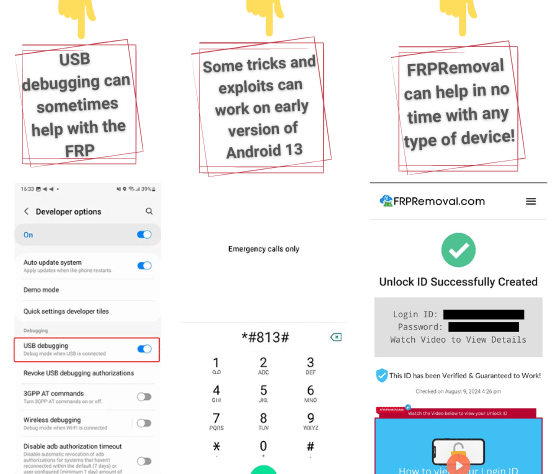
Besides the official method and APKs, there are other ways to remove the FRP lock on Android. Some can be programs that use USB debugging to remove the FRP lock, and others can use some exploits to access the main menu of the device and change or delete the account. The last option, which is also a great solution, is to use Android FRP bypass online solutions like FRPRemoval, which, instead of messing with settings, provides a quick solution with the help of dummy credentials.
Now, one thing to take into consideration when attempting to bypass the FRP lock on Android 13 is that many depend on the security and the Android version they are running. So, if your version is not compatible, it might not work, or there might be more or fewer tools for you to try. In the case of FRPRemoval, that is not an issue, as we can remove FRP locks on any Android device and version without issues using an excellent method that is not invasive or dependent on the security patch.
Is TalkBack still a Working Method in Android 13?
Is TalkBack still a Working Method in Android 13?
No, TalkBack is no longer a reliable FRP tool bypass method for Android 13… The reason is that Google patched most TalkBack exploits (launching the browser or Settings through TalkBack help menus). Also, all accessibility features are now sandboxed and heavily restricted during FRP lock. So, you’re usually blocked from accessing apps, web browsers, or settings through TalkBack. However, it might work on older security patches or unpatched devices, but it is still not guaranteed.
Do I need my IMEI to Unlock FRP?
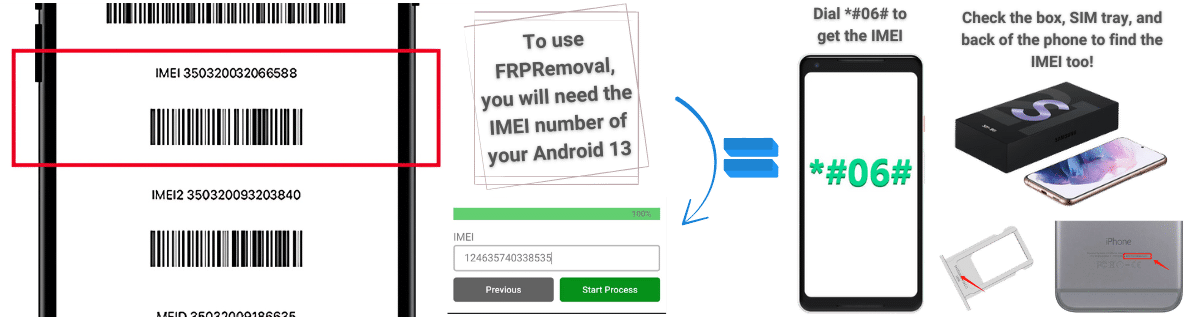
If you are going to use services like FRPRemoval, yes, you will need the IMEI of your device to remove Google FRP locks (dial *#06# to get it). This is because the IMEI code has all the necessary info to help us create a temporary ID that can grant you access even if your device runs the latest Android version. It also helps make the process easier, as you can do it without passwords or installing the FRP bypass tool for PC.
Will FRPRemoval FRP Unlock Android 13 Service Work on My Model?
No, factory resetting again won’t help bypass FRP. It just re-triggers the FRP lock in any case… Basically, you will still need to enter the original Google account after every reset if you haven’t deleted the account in the device settings.
Only sometimes, as most APK-based FRP bypass methods are blocked on Android 13 due to tighter security. However, they may work on older security patches, but usually can’t be installed during setup on updated devices after Android 13.
FRP unlock is possible on many Android 13 brands like Samsung, Xiaomi, Motorola, Oppo, Huawei, and many more. If you want a list, you can check the FRPRemoval service and there check the supported devices list and see if your phone shows up on the list. If it does, then it is possible to remove the FRP.