The Best Tool for Google FRP is Here! โ€“ Oppo

The Best Tool for Google FRP is Here! โ€“ Oppo

Smooth, Fast and Sercure Unlocking!

Unlock your Android device in minutes with our trusted FRP Removal Online Service โ€” compatible with all Oppo models. For just $2, you can bypass FRP lock without complicated tools or risky downloads. Our service is fast, secure, and works on all Android versions.ย 

FRP Bypass Guide - Enhanced Section
๐Ÿ›ก๏ธ

FRP Bypass Guide

Your Complete Oppo Solution

At FRPRemoval, we are committed to helping users understand the FRP lock and what methods and solutions they have available to fix this issue. In today's guide, we want to focus on Oppo phones since they are becoming very popular. Since they still use this security feature, we'd like to guide you on how to FRP bypass Oppo with FRPRemoval, along with other helpful tips and information about this Google lock. So let's begin.

๐Ÿ“‹
Step by Step
โœ…
Safe Methods
๐Ÿ’ก
Expert Tips
How to identify if your Oppo device is FRP locked

How to identify if your Oppo device is FRP locked

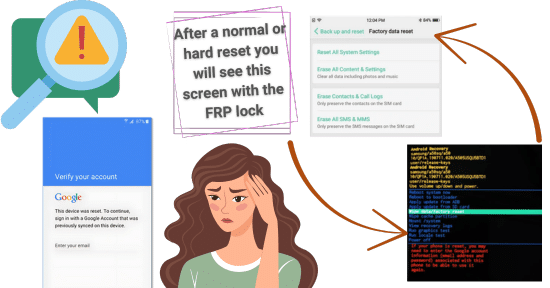
To identify if your Android phone has this feature active, you only need to check for a screen asking for your Google credentials after a hard reset. After initiating the phone and starting the initial setup, you will need to enter your home's Wi-Fi to continue. The next step involves the FRP lock screen. To bypass this step and proceed to the second part of the setup, enter the Google credentials registered on the device. If you don't have them, you can try to recover them or use FRPRemoval, for example.

Quick Tip: Look for Google account verification after factory reset
๐Ÿ‘ค

Can I enter my Oppo Account instead of the Google one to remove the FRP lock?

No, the Oppo account and the Google account are two different things. Even though you can share the same email, they are not related to each other. Occasionally, after bypassing the FRP, you may be prompted to enter your Oppo account to check backups, sync data, and remove the Oppo ID lock. This is only necessary if the feature is enabled; otherwise, you should be able to skip it.

๐Ÿ›ก๏ธ

Is the Oppo ID lock the same as the Oppo FRP lock?

They are similar in that they both work as lock screens designed to prevent unauthorized access, but they are managed independentlyโ€”one by the manufacturer and the other by Google. Now, if your Oppo device had both a Google and an Oppo account signed in before being factory reset, it could be double-locked, making it more difficult to access the main screen, as you will need to enter valid credentials for both of them.

Android versions that support FRP on Oppo

Android versions that support FRP on Oppo

The Factory Reset Protection for these devices has been supported since Android 5.1 (Lollipop), and it continues to exist after that as well, up to the latest version. This includes most Oppo smartphones released since around 2015... Here's a little list so you can get a better idea and see if your device is there as well!

๐Ÿค–

Can I bypass Oppo FRP lock on the latest Android versions?

Trying to bypass the FRP lock on Android 15 and 16 can be difficult since they are more recent versions with new security features, so your regular FRP bypass tools may have some compatibility issues. Since many unlock tools require you to connect your Oppo device to a PC, you may experience several delays and even complications, as the newer security patches can block the connection, even via USB.

However, the community is still working on new ways to bypass FRP locks without a PC. In the meantime, you can use FRPRemoval for those newer devices and regain access! We support all Oppo models and Android versions, so you can have the best service without having to install programs or wait for another solution to fix your Android device.

๐Ÿ’ก

โœ“ All Oppo models supported โœ“ All Android versions โœ“ No PC required

Does Oppo have a support policy for FRP-locked devices?

In some regions, they do, as there's specialized support to help you unlock your device. If you want to know if that's possible in your country, you can call Oppo and explain the situationโ€”that you reset your Oppo smartphone and now it is locked to the FRP, and you can't recover the Google account. The representative will ask you to please provide your information and, if you have it available, proof of purchase. After they verify that, they should give you some steps to remove the FRP lock on your Oppo or to go to a store for further assistance.

How can I remove the old Google account permanently?
โœ•

How can I remove the old Google account permanently?

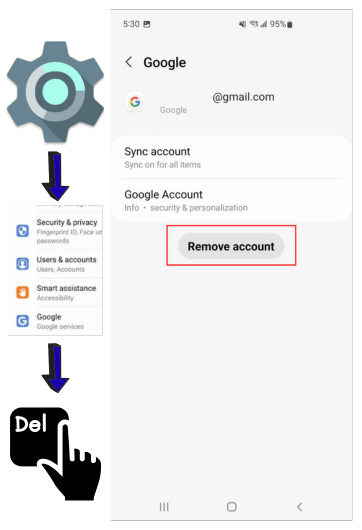
Basically, to permanently remove an old Google account from your Oppo device and prevent FRP from activating, you need to remove the account from the device settings while it's still unlocked. To remove the Google account, follow these steps after unlocking your Oppo with FRPRemoval: go to Settings > Accounts and select the account you want to remove. However, keep in mind that it is going to ask for the password, but at least you can get the email to reset it and finally delete it from the device.

โœ“
Remove before lockout - Settings > Accounts > Remove
๐Ÿ”’

Will my Oppo lock permanently if I fail too many times at Google account verification?

In this case, it will only lock you out temporarily. A good thing about the FRP lock is that you can try as many emails as you want; it's not going to brute force it, as you need the correct credentials... But at least you can try different emails that you might remember, or if you are using an Oppo FRP bypass tool, you know it's not going to be permanently locked after each attempt.

๐Ÿ”„
Only temporary lockout - Try multiple emails safely
Will my Oppo lock permanently if I fail too many times at Google account verification?

Step-by-step to FRP bypass Oppo devices with FRPRemoval
Step by step FRP bypass Oppo tutorial
โœ๏ธ
Step 1

Fill Form & Register

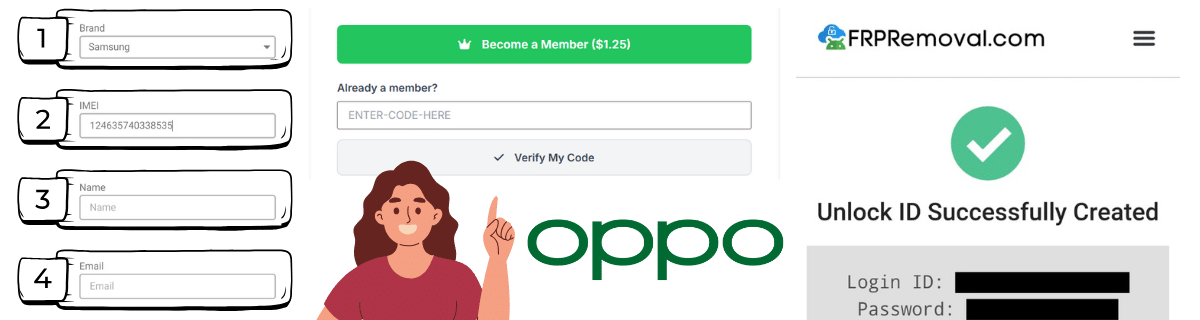
To bypass FRP on Oppo devices and unlock your device right away, you can go to our main site and fill out the form you will see on the screen with your phone brand, IMEI number, name, and email address. To continue using our professional Oppo FRP services, you will need to register on the site and activate your order with an access key.

โ„น๏ธ Register and activate with access key
๐Ÿ”‘
Step 2

Use Dummy Credentials

Once the order is activated, you will get a dummy ID that you need to enter on the locked device. These temporary credentials will bypass the Oppo FRP screen and allow you to continue with the normal setup. As soon as you have access to the main screen, you can go ahead and go into the settings to delete or add a new account.

๐Ÿ”“ Enter dummy ID on locked device
โš™๏ธ
Step 3

Manage Accounts

From there, you can either reset the phone again (remember to have no account or a valid one so the FRP doesn't trigger again) or continue using it normally, as the temporary credentials will expire after some time, allowing you to use other accounts.

โœ… Reset or continue - credentials expire automatically

Because you still need that Google account to use Google services and access certain apps. You can’t use the phone without an account, so that’s why it’s recommended to remove it only if you are going to do a default and nothing else.ย 

Not really, as there are still some FRP bypass APKs that can be downloaded with all tricks (if the Android version is very old). There are also FRP unlock tools like FRPRemoval that can be accessed on any device, so they don’t always require a PC.ย 

Second-hand devices are more difficult to unlock through official methods unless you have contact with the previous owner. Additionally, they can have more issues or locks than a regular new phone, making them unreliable and difficult to use.ย